Backup Codes in Customer Portal
Last updated: March 18, 2026
What are backup codes?
Backup codes are extra PIN codes that Seam pre-programs onto your lock ahead of time, just in case something goes wrong with a guest's regular access code.
When Seam creates a regular access code, it needs to communicate with the lock over the internet to program it. Occasionally, this process can fail — due to a temporary internet outage, the lock losing connection, or an issue with the lock manufacturer's system. If that happens, the guest's code won't work.
Backup codes solve this by having spare, working codes already on the lock before any issues arise. If a regular code fails to program, Seam can pull one of these backup codes and give it to the guest so they can still get in.
How backup codes appear in Customer Portal
In your Customer Portal, backup codes are listed alongside regular access codes in a device's code list. They are labeled distinctly as "Backup" so they're easy to identify at a glance.
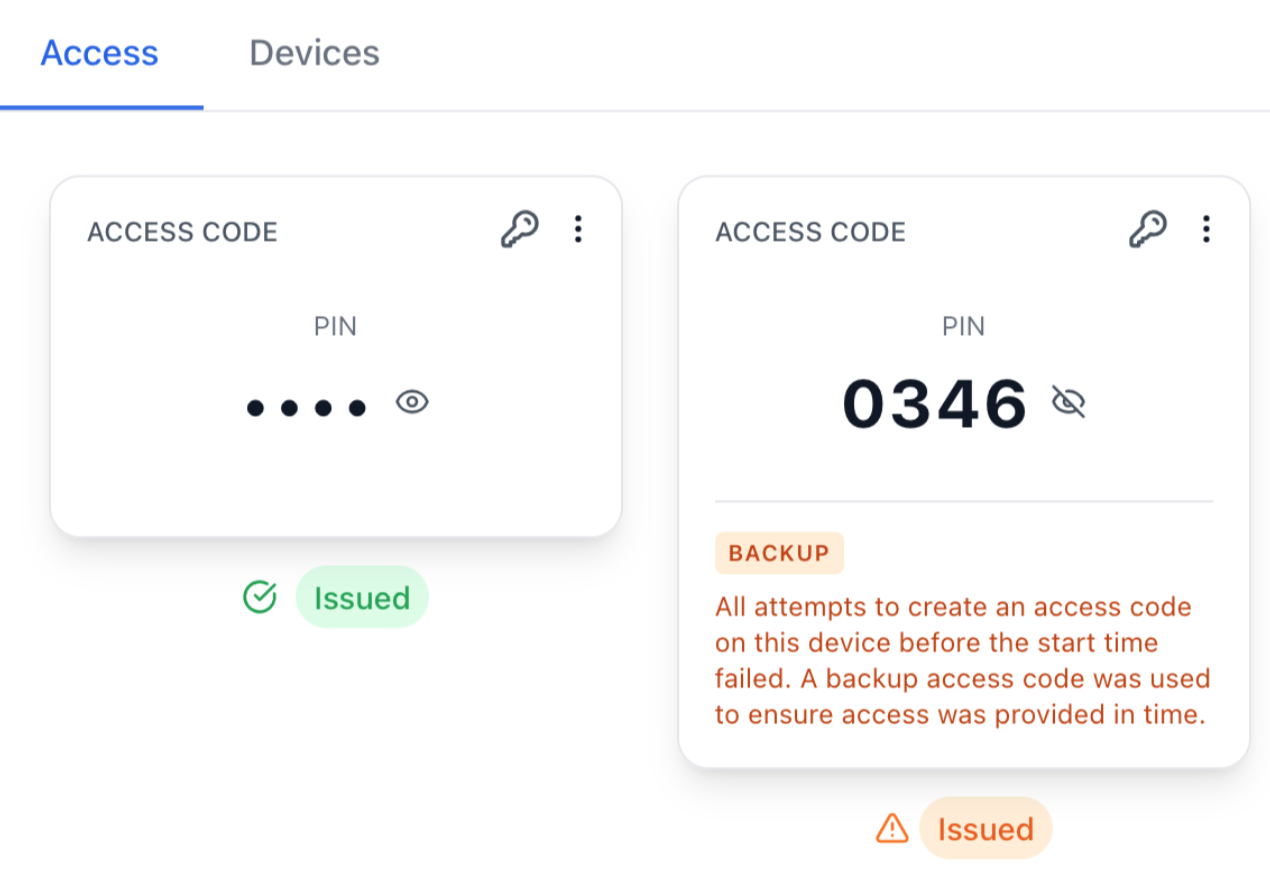
You won't normally need to interact with backup codes day-to-day. They sit quietly in the background, and Seam manages them automatically. They only come into play when a regular code runs into a problem.
What this means for your guest
Your guest's experience is unaffected. They receive a working PIN code for the door and use it normally. They won't know (or need to know) whether it's a primary code or a backup code.
Limitations compared to regular access codes
Backup codes behave differently from regular access codes in a few important ways:
They only work with time-bound codes. Backup codes are a safety net for guest codes with a set start and end time (like a check-in/check-out window). They are not available for ongoing codes, such as a code that stays active indefinitely for a long-term resident.
You can't customize their name or PIN. Unlike regular codes where you can choose a name and sometimes a specific PIN, backup codes are automatically generated by Seam. Their names and PINs are assigned by the system.
They're shared across all codes on the device. All time-bound codes on a single lock draw from the same pool of backup codes. If multiple codes fail at the same time, the pool could be depleted faster.
The pool can run out. Seam keeps a limited number of backup codes pre-programmed on each lock. If many codes have failed and backup codes have been used up, no more may be available until the pool is refilled. When this happens, the pool will show as exhausted.
Once enabled, the backup pool stays on. Once the backup code pool is activated for a device, it stays active — there's no way to turn it off for that lock without removing the device from Seam entirely. This is by design, so the safety net is always in place.
They may show up in the lock's manufacturer app. If you or your guests use the lock brand's own app (e.g., August, Schlage, Yale), backup codes will appear in the code list there as well, labeled "Backup [code ID] (Seam)". This is normal and expected — they are real codes programmed onto the lock.
What to do if you see a backup code warning
If you notice a warning in the portal that multiple backup codes have been pulled, or that the backup pool is exhausted, it's a sign that Seam has been having trouble programming codes onto that lock. Common causes include:
The lock is offline or has a weak connection
The lock is running out of space for new codes (some locks have a limit on how many codes they can hold)
A temporary issue with the lock manufacturer's system
In this case, check that the lock is online and connected, and reach out to Seam support if the issue persists.
Frequently asked questions
Can a backup code be used for a long-term or permanent code?
No. Backup codes are only available for reservation-based (time-bound) codes that have a set check-in and check-out time. Permanent codes, such as those for staff or maintenance, do not use the backup code pool.
What happens if all the backup codes have been used up?
Each lock keeps a pool of up to 5 backup codes. In rare cases where multiple reservation codes fail at the same time and the entire pool is exhausted, a backup may not be available until the lock reconnects and the pool can be refilled. If this happens, the portal will indicate that no backup code is available, and you should contact support.
Will the backup code automatically stop working at checkout?
Yes. Backup codes follow the exact same schedule as the reservation they're covering. Once the checkout time passes, the backup code is removed from the lock automatically.
Do I need to set anything up for backup codes to work?
No. Backup codes are configured and managed for you. As long as your lock supports them, the pool is maintained automatically.